
Poly bag dielines · full size · print ready
Your bag's dieline, drawn in seconds.
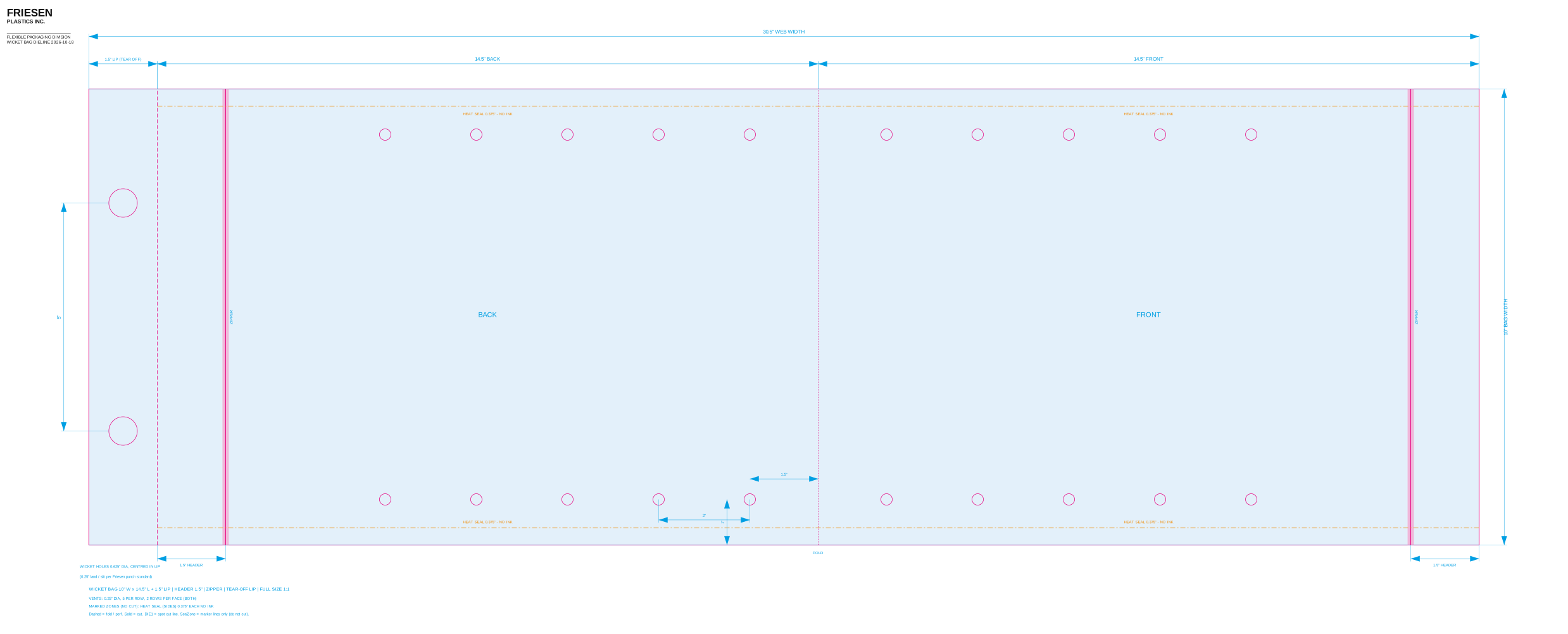
Enter the size, lip, header, zipper and closure details. Get a true-scale dieline with cut lines, wicket holes and no-print zones — ready for your designer to drop artwork onto.
Free to use. No account needed to preview.
Built for packaging
Everything a bag template needs, nothing it doesn't.
Made by the people who run these bags on press every day, so the rules are baked in.
Wicket bag rules built in
Every wicket bag gets its lip and punch holes. Side gussets are blocked; bottom gussets are drawn as dashed folds.
Header, zipper, tear-off lip
Zipper shown as a band on the header line. Tear-off lips and gussets are drawn as dashed perforations and folds.
Vent holes only when you want them
Choose none, a standard produce pattern, or set the count, size and spacing yourself.
Closure and seal zones
Mark Kwik Lok, tape-seal and heat-seal areas so no critical print gets squished, skewed or inked where it must stay clear. Marker lines only — the cut never changes.
Artwork check
Drop your artwork onto the live dieline and see exactly which marked zones it runs into.
Press-ready checks
Warnings flag web widths over the press limit, vent holes that run off the bag, and conflicting options.
Saved presets
Save a bag spec by name and reload it next time — handy for repeat sizes.
Layered, labelled files
Cut line, vent holes, seal zones, dimensions and branding each live on their own layer so they're easy to hide or lock.
How it works
Three steps from size to dieline.
Enter your bag
Width, length, lip, plus any header, zipper, gusset, vents or closure zones. Rules are checked as you type.
Preview it live
See the dieline update instantly at true scale. Drop your artwork on it to check the no-print zones.
Request your file
Send your contact details and a Friesen sales representative emails you the print-ready dieline.
No surprises on press
Mark where print shouldn't go.
Closures and seals change what the printed bag looks like. Zones are drawn as marker lines over the artboard — they never trim your art or change the cut.
- Kwik Lok — the gathered neck area where print gets squished.
- Tape seal — the strip a tape closure covers.
- Heat seal — side and top margins that must stay free of ink.
FAQ
Good to know
What is a dieline?
A flat, full-size outline of the bag showing cut lines, folds, holes and seal areas. Designers place artwork on it so the printed bag comes out right.
Which bag styles are available?
Wicket (lip) bags today, with optional bottom gusset, header, zipper and tear-off lip. Bottom-seal, side-seal, side-gusset and rollstock styles are coming.
What file formats do I get?
A full-size PDF with a spot-colour cut line and layers. SVG and DXF versions are available for plate makers and CAD on request.
Why is the file emailed instead of downloaded?
A Friesen sales representative reviews each request and sends the file, so you can also ask about sizes, films and printing in the same conversation.
Is it free?
Yes. Previewing is free and needs no account.
Can I use it from an AI assistant?
Yes. Dieline Creator publishes an MCP server and an OpenAPI description so assistants can draw a dieline for you. See llms.txt.